 MoviView
Android simulator for Chrome
Check your website on a Samsung Galaxy, a Pixel or a foldable without leaving your tab, with true-to-scale frames and the site's real mobile version. No Android Studio, nothing to set up.
Free forever · PRO from US$5 a month
Android phones, the way your visitors see them
From the latest Galaxy to the phones most people really use.
The real Android version
Each phone identifies itself as Chrome on Android with its own screen size, so sites with a separate mobile version show it.
51 Android phones
Galaxy S and A series, Pixel, Xiaomi and Redmi, OnePlus, Motorola and Huawei, with punch-hole cameras and true-to-scale bezels.
Foldables too
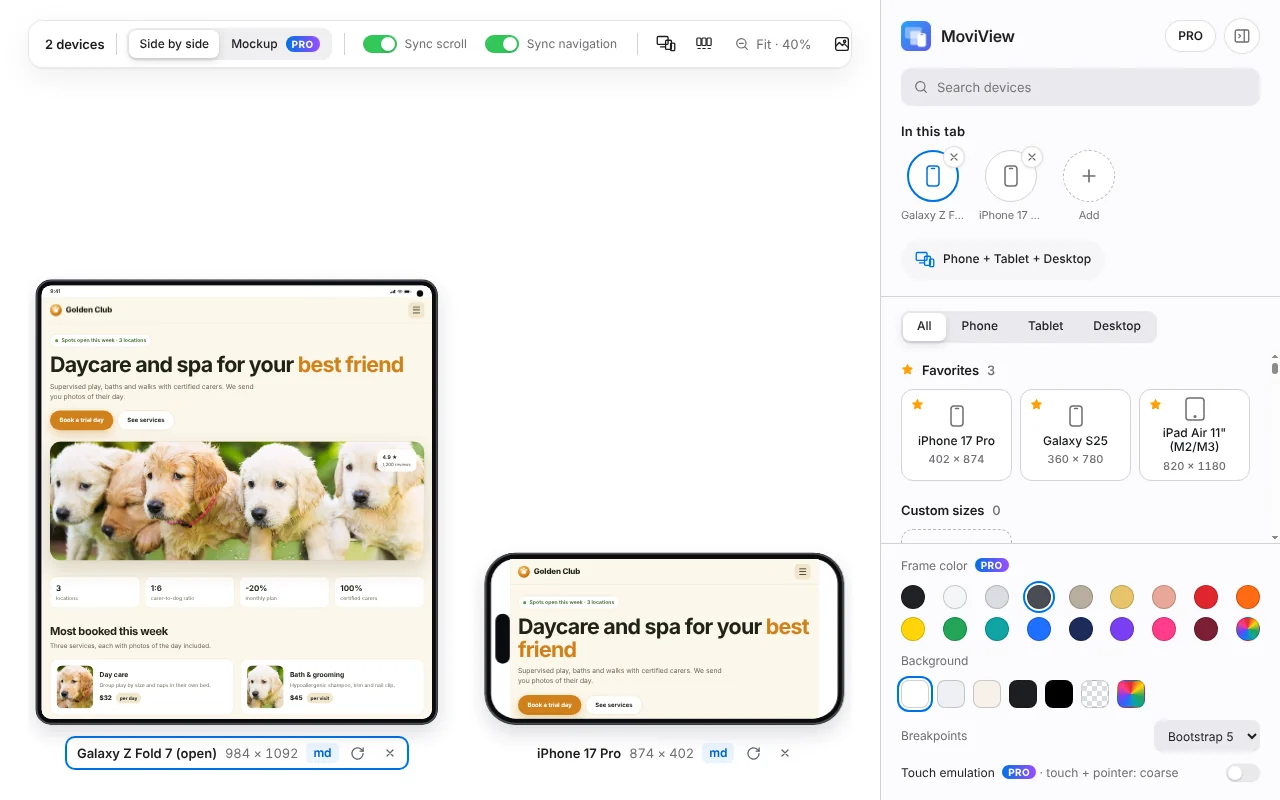
With PRO: Galaxy Z Fold 7 open, Z Fold 5 closed and Galaxy Z Flip 7, to see how your layout handles their unusual sizes.
Android next to iPhone
Compare the same page on a Galaxy and an iPhone side by side, up to 6 devices, with synced scrolling.
Android tablets
With PRO: Galaxy Tab S10 and S11, Pixel Tablet, Xiaomi Pad, Lenovo Tab and Amazon Fire, among 37 tablets.
localhost and staging
It works on your local server and on sites that block iframes. Everything runs in your own Chrome.
Every Android phone included
Sizes are the viewport in CSS pixels, in portrait. Models marked Free are in the free plan; the rest come with PRO.
- Galaxy S26 Ultra412 × 891
- Galaxy S26+412 × 891
- Galaxy S26360 × 780
- Galaxy S25 Ultra412 × 891
- Galaxy S25 Edge412 × 891
- Galaxy S25+412 × 891
- Galaxy S25360 × 780 Free
- Galaxy S24360 × 780
- Galaxy S23360 × 780
- Galaxy S21 Ultra384 × 854
- Galaxy S20 Ultra412 × 915
- Galaxy S20360 × 800
- Galaxy Note20 Ultra412 × 883
- Galaxy S10360 × 760
- Galaxy S9360 × 740
- Galaxy S8360 × 740
- Galaxy A55412 × 892
- Galaxy A54412 × 892
- Galaxy A36412 × 918
- Galaxy A35412 × 892
- Galaxy A51/71412 × 914
- Pixel 10412 × 924
- Pixel 9 Pro XL448 × 997
- Pixel 9 Pro427 × 952
- Pixel 9412 × 924 Free
- Pixel 8 Pro448 × 997
- Pixel 8412 × 915
- Pixel 8a412 × 915
- Pixel 7 Pro412 × 892
- Pixel 7412 × 915
- Pixel 7a412 × 915
- Pixel 6 Pro412 × 892
- Pixel 6412 × 915
- Pixel 5393 × 851
- Redmi Note 13393 × 873
- Xiaomi Mi 10T393 × 873
- Redmi Note 9 Pro393 × 873
- Xiaomi Mi 10393 × 851
- Redmi Note 8393 × 851
- OnePlus 13412 × 905
- OnePlus 12412 × 905
- OnePlus Nord 4360 × 924
- OnePlus Nord412 × 915
- Moto G Power412 × 823
- Moto G8360 × 780
- Huawei P40 Pro400 × 880
- Huawei Mate 30 Pro392 × 800
- Huawei P30 Pro360 × 780
- Galaxy Z Fold 7 (open)984 × 1092
- Galaxy Z Fold 5 (closed)344 × 882
- Galaxy Z Flip 7360 × 840
How to use it
Three steps, less than a minute.
Install MoviView
Add it to Chrome from the Chrome Web Store. It's free and needs no account.
Open your site
Go to the page you want to check, online, on staging or on localhost, and click the MoviView icon or press Alt+Shift+V.
Pick a Galaxy or a Pixel
Choose the phone from the list, rotate it, add an iPhone next to it or take a screenshot.
Frequently asked questions
Is it an Android emulator like Android Studio?
No. MoviView doesn't run Android or its apps: it shows websites with each phone's screen size and Chrome-on-Android identity. To test native apps, use the Android Studio emulator.
Which Android phones are free?
Samsung Galaxy S25 and Google Pixel 9. The other 49 Android phones, the foldables and the Android tablets come with PRO.
Does it work on Windows and Mac?
Yes, on any computer with Chrome: Windows, macOS, Linux or ChromeOS.
Can I test a site on localhost?
Yes. MoviView works on localhost, on staging servers and on sites that don't allow being shown inside an iframe.