 MoviView
Website mockups in seconds
No templates, no Photoshop, no pasting screenshots. Open your site, switch to Mockup mode and download a ready-to-present image of the live page.
Free forever · PRO from US$5 a month
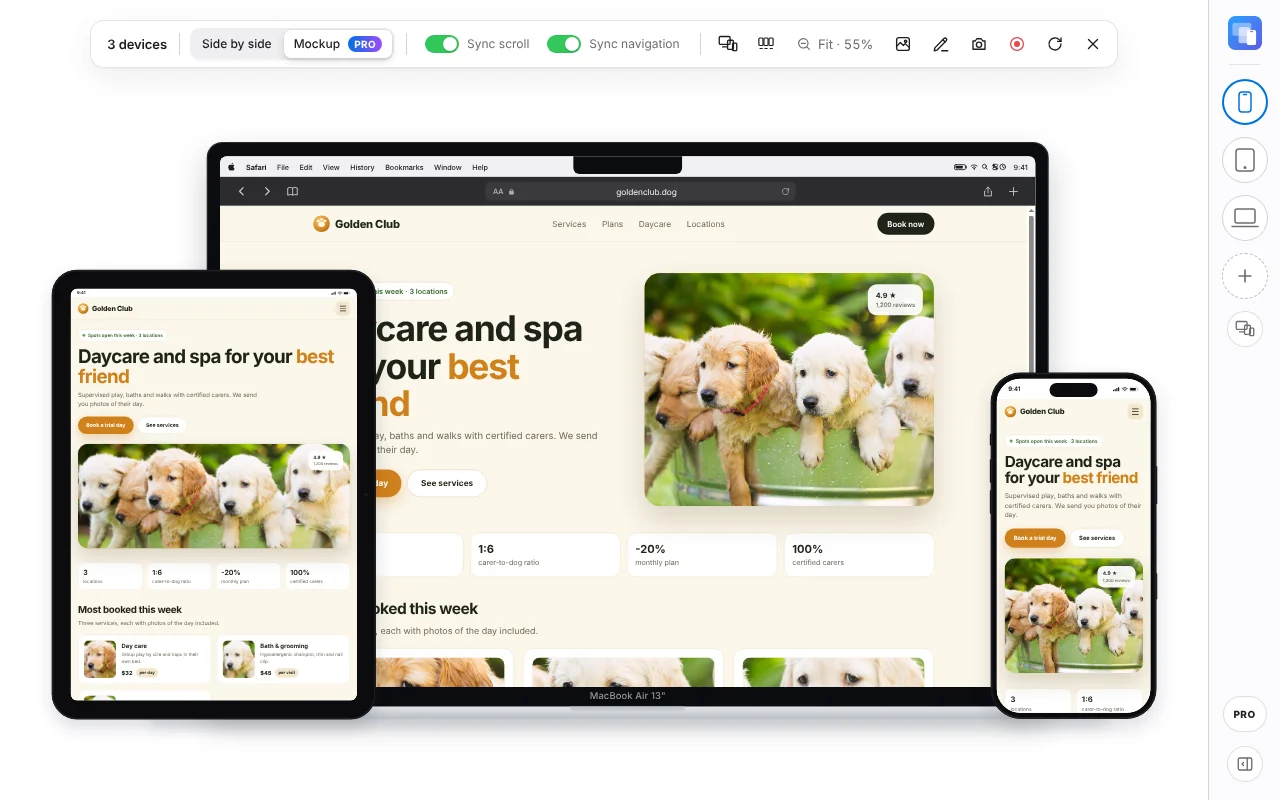
Client-ready in one click
For proposals, case studies, portfolios and social media.
Layered like an agency deck
MacBook, iPad and iPhone overlapping in one composition, up to 6 devices.
Your live site, not a screenshot
Each device shows the real page: scroll each one to the section you want before you export.
17 frame colors or any color
Black, White, Silver, Natural Titanium, Cosmic Orange, Deep Blue and more, or pick the exact color of your brand.
Transparent background
Export a PNG with no background to drop into slides and proposals, or use any background color.
Annotate before you send
Add arrows, text and numbered steps on top to explain changes. They show up in the image.
Video, too
Record the devices as MP4, with visible taps on phones and tablets, for a quick walkthrough.
How to use it
Three steps, less than a minute.
Install MoviView
Add it to Chrome from the Chrome Web Store. It's free and needs no account.
Open your site
Go to the page you want to check, online, on staging or on localhost, and click the MoviView icon or press Alt+Shift+V.
Switch to Mockup
Choose your devices, pick Mockup, a frame color and a background, and take the screenshot.
Frequently asked questions
Is Mockup mode free?
Mockup mode is part of MoviView PRO, from US$5 a month. The free plan takes side-by-side screenshots of up to 3 devices on white, gray, cream, dark or black.
Which devices can I use?
Any of the 143 models: iPhone, Galaxy, Pixel, foldables, iPad, Galaxy Tab, Surface, MacBook, iMac and more, up to 6 in one mockup.
Do I need design software?
No. Everything happens in Chrome, and the PNG downloads straight to your computer.