 MoviView
iPhone simulator for Chrome
See any website on an iPhone without leaving your tab: true-to-scale frame, Dynamic Island and the site's real mobile version. No Mac, no Xcode, no sign-up.
Free forever · PRO from US$5 a month
Everything an iPhone check needs
Built for web developers, designers and QA.
The real iPhone version
Each iPhone identifies itself as Safari on iOS with its own screen size, so sites that serve a separate mobile version actually show it.
Every iPhone, to scale
45 models from the iPhone 5 to the iPhone 18 Pro Max, with Dynamic Island, notch, buttons and the exact viewport of each one.
Next to Android, iPad or Mac
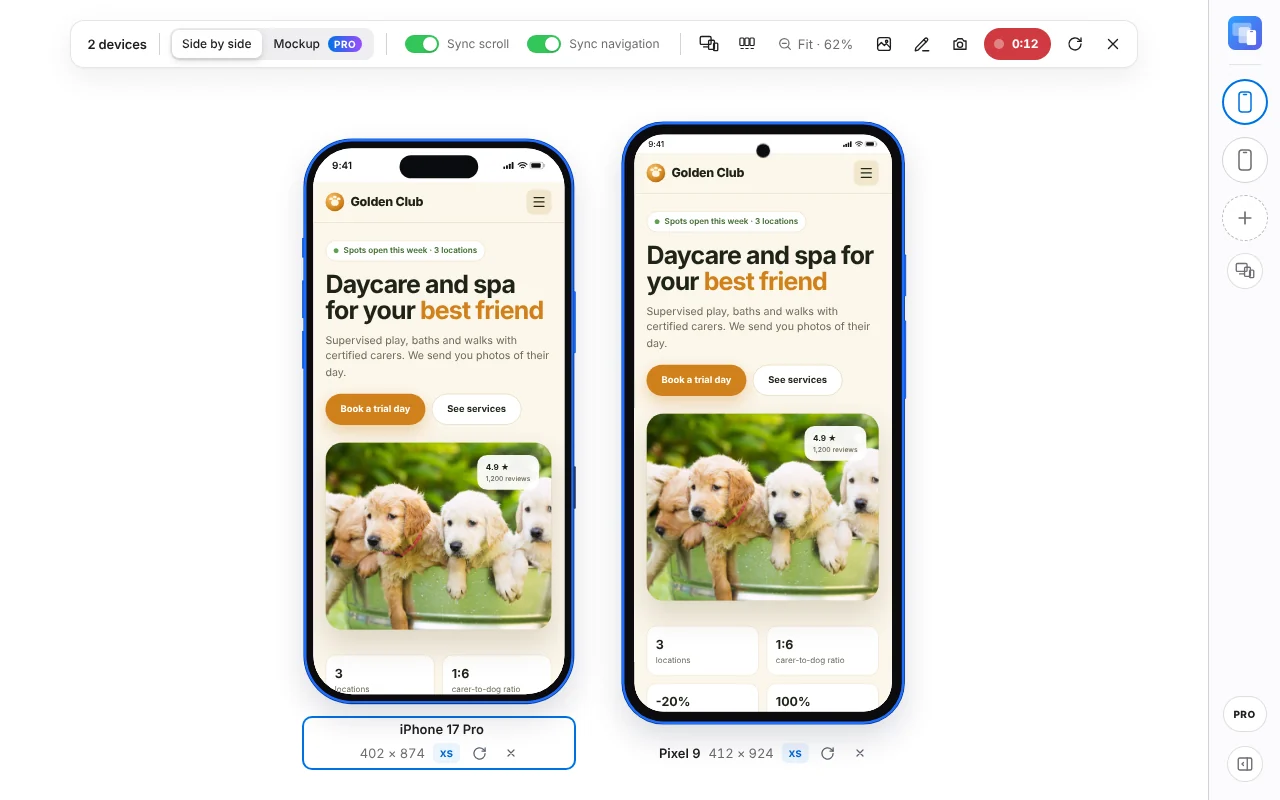
Put an iPhone beside a Galaxy, an iPad or a MacBook, up to 6 devices, with synced scrolling and navigation.
Portrait and landscape
Rotate the iPhone with one click and see how your layout reacts.
Screenshots for your client
Download a full-resolution PNG with the iPhone frame included. With PRO, record MP4 video with visible taps.
localhost and staging
It works on your local server and on sites that block iframes. Everything runs in your own Chrome.
Every iPhone model included
Sizes are the viewport in CSS pixels, in portrait. Models marked Free are in the free plan; the rest come with PRO.
- iPhone 18 Pro Max440 × 956
- iPhone 18 Pro402 × 874
- iPhone Air420 × 912
- iPhone 17 Pro Max440 × 956 Free
- iPhone 17 Pro402 × 874 Free
- iPhone 17402 × 874
- iPhone 17e390 × 844
- iPhone 16 Pro Max440 × 956
- iPhone 16 Pro402 × 874
- iPhone 16 Plus430 × 932
- iPhone 16393 × 852 Free
- iPhone 16e390 × 844
- iPhone 15 Pro Max430 × 932
- iPhone 15 Pro393 × 852
- iPhone 15 Plus430 × 932
- iPhone 15393 × 852
- iPhone 14 Pro Max430 × 932
- iPhone 14 Pro393 × 852
- iPhone 14 Plus428 × 926
- iPhone 14390 × 844
- iPhone 13 Pro Max428 × 926
- iPhone 13 Pro390 × 844
- iPhone 13390 × 844
- iPhone 13 mini375 × 812
- iPhone 12 Pro Max428 × 926
- iPhone 12 Pro390 × 844
- iPhone 12390 × 844
- iPhone 12 mini375 × 812
- iPhone 11 Pro Max414 × 896
- iPhone 11 Pro375 × 812
- iPhone 11414 × 896
- iPhone XS Max414 × 896
- iPhone XR414 × 896
- iPhone XS375 × 812
- iPhone X375 × 812
- iPhone SE (2022)375 × 667 Free
- iPhone 8 Plus414 × 736
- iPhone 8375 × 667
- iPhone 7 Plus414 × 736
- iPhone 7375 × 667
- iPhone 6 / 6s375 × 667
- iPhone SE (1st gen)320 × 568
- iPhone 5 / 5s320 × 568
- iPhone Duo (open)669 × 951
- iPhone Duo (closed)466 × 678
How to use it
Three steps, less than a minute.
Install MoviView
Add it to Chrome from the Chrome Web Store. It's free and needs no account.
Open your site
Go to the page you want to check, online, on staging or on localhost, and click the MoviView icon or press Alt+Shift+V.
Pick an iPhone
Choose the model from the list, rotate it, add more devices or take a screenshot.
Frequently asked questions
Is it a real iPhone?
No. MoviView recreates the iPhone screen inside Chrome: the same viewport size and the iOS identity, so the site sends you its mobile version. The page is still drawn by Chrome, not Safari, so for bugs specific to Safari's engine also check on a physical iPhone.
Do I need a Mac or Xcode?
No. It works wherever Chrome runs: Windows, macOS, Linux and ChromeOS. There's nothing to install besides the extension.
Which iPhones are free?
iPhone 17 Pro Max, iPhone 17 Pro, iPhone 16 and iPhone SE (2022). The other 41 iPhones come with PRO, from US$5 a month.
Can I test a site on localhost?
Yes. MoviView works on localhost, on staging servers and on sites that don't allow being shown inside an iframe.